TBD Holger's TODOs #18

Open
opened 2024-10-25 15:13:44 +02:00 by Frank · 10 comments
Owner

We talked about these, but time is running out on Friday afternoon. So, for now, copied here as is and to be discussed more.

  • No module named 'pydantic_settings' with pyhon 3.11
  • fastapi upgrade #22
  • renovobot or alike
  • unwelcoming error message if env variables are not set
  • How to develop concurrently amarillo and it's plugins?
  • ADMIN_TOKEN=test RIDE2GO_TOKEN=test METRICS_USER=metrics METRICS_PASSWORD=metrics uvicorn amarillo.main:app: all required? then should be documented
  • GTFS endpoints are missing. They are under default which is wrong
  • Start starts using 127.0.0.1 - should be localhost everywhere, incl. the console output
  • posting the example does not work, as mfdz is not configured on startup
  • Create make_sample_data.sh which creates
  • amarillo.plugins.metrics.metrics - WARNING - File 'error.log' not found.
  • Support OPTIONS request(?). Aim is i.e. to avoid confusing log messages - enable OPTIONS request if that helps removing confusing log message
  • requirements.gtfs.txt
  • cascaded docker build: after amarillo-base, build amarillo-gtfs
  • Handle user/group, see e.g. https://www.baeldung.com/ops/docker-set-user-container-host
We talked about these, but time is running out on Friday afternoon. So, for now, copied here as is and to be discussed more. - [ ] No module named 'pydantic_settings' with pyhon 3.11 - [ ] fastapi upgrade #22 - [ ] renovobot or alike - [ ] unwelcoming error message if env variables are not set - [x] How to develop concurrently amarillo and it's plugins? - [x] ADMIN_TOKEN=test RIDE2GO_TOKEN=test METRICS_USER=metrics METRICS_PASSWORD=metrics uvicorn amarillo.main:app: all required? then should be documented - [x] GTFS endpoints are missing. They are under default which is wrong - [ ] Start starts using 127.0.0.1 - should be localhost everywhere, incl. the console output - [ ] posting the example does not work, as mfdz is not configured on startup - [ ] Create make_sample_data.sh which creates - [x] amarillo.plugins.metrics.metrics - WARNING - File 'error.log' not found. - [ ] Support OPTIONS request(?). Aim is i.e. to avoid confusing log messages - enable OPTIONS request if that helps removing confusing log message - [ ] requirements.gtfs.txt - [ ] cascaded docker build: after amarillo-base, build amarillo-gtfs - [x] Handle user/group, see e.g. https://www.baeldung.com/ops/docker-set-user-container-host
Frank self-assigned this 2024-10-25 15:13:44 +02:00
Csaba was assigned by Frank 2024-10-25 15:13:44 +02:00
Frank added this to the Amarillo project 2024-10-25 15:13:44 +02:00
Owner

How to develop concurrently amarillo and it's plugins?

To do this you need to install the local version of the plugin into amarillo's venv, simply using pip install /path/ to/plugin. You can try the -e flag to make an editable install, then you don't have to keep running it again and again, but I have not had success with that (I remember it was a VS code specific problem).

Handle user/group, see e.g. https://www.baeldung.com/ops/docker-set-user-container-host

We already have

RUN useradd amarillo
USER amarillo

in all the docker deployments. We could add the group too, not sure how important that is.
The one problem i know of is that if the /data directory does not exist and you run the compose file, it will create the /data folder when it mounts it. Therefore it will have the permissions you launched docker compose up with, so if you used sudo it can cause the /data folder to be owned by root. This will not be a potential problem anymore once we have the sample data creation script: either the data folder will already be there from a previous version or we will set it up correctly in the script.

> How to develop concurrently amarillo and it's plugins? To do this you need to install the local version of the plugin into amarillo's venv, simply using `pip install /path/ to/plugin`. You can try the `-e` flag to make an editable install, then you don't have to keep running it again and again, but I have not had success with that (I remember it was a VS code specific problem). > Handle user/group, see e.g. https://www.baeldung.com/ops/docker-set-user-container-host We already have ```dockerfile RUN useradd amarillo USER amarillo ``` in all the docker deployments. We could add the group too, not sure how important that is. The one problem i know of is that if the /data directory does not exist and you run the compose file, it will create the /data folder when it mounts it. Therefore it will have the permissions you launched `docker compose up` with, so if you used sudo it can cause the /data folder to be owned by root. This will not be a potential problem anymore once we have the sample data creation script: either the data folder will already be there from a previous version or we will set it up correctly in the script.
Owner

No module named 'pydantic_settings' with pyhon 3.11

I am unable to reproduce this using a fresh python3.11 venv. Make sure when you run uvicorn amarillo.main:app it uses the venv rather than the global python executable. You might need to run it as python3.11 -m uvicorn amarillo.main:app or even specify the path to the python executable

Support OPTIONS request(?). Aim is i.e. to avoid confusing log messages

Running an OPTIONS request in curl gives 405 Method Not Allowed, and the same message appears in the logs. Interestingly, it does respond with an allow header still

curl -X OPTIONS https://amarillo-dev.mfdz.de/carpool/ -i

HTTP/2 405 
allow: POST
content-type: application/json
date: Wed, 30 Oct 2024 13:35:41 GMT
server: Caddy
server: uvicorn
content-length: 31

{"detail":"Method Not Allowed"}%    

I have not found an option that produces an OPTIONS request in the web UI.

Searching for fastapi options request mostly yields results talking about CORS, I'm not sure if that applies. Best I could find is https://github.com/fastapi/fastapi/issues/2008, that might be what you are looking for, but it was left hanging it seems.

> No module named 'pydantic_settings' with pyhon 3.11 I am unable to reproduce this using a fresh python3.11 venv. Make sure when you run `uvicorn amarillo.main:app` it uses the venv rather than the global python executable. You might need to run it as `python3.11 -m uvicorn amarillo.main:app` or even specify the path to the python executable > Support OPTIONS request(?). Aim is i.e. to avoid confusing log messages Running an OPTIONS request in curl gives `405 Method Not Allowed`, and the same message appears in the logs. Interestingly, it does respond with an `allow` header still ```bash curl -X OPTIONS https://amarillo-dev.mfdz.de/carpool/ -i HTTP/2 405 allow: POST content-type: application/json date: Wed, 30 Oct 2024 13:35:41 GMT server: Caddy server: uvicorn content-length: 31 {"detail":"Method Not Allowed"}% ``` I have not found an option that produces an OPTIONS request in the web UI. Searching for `fastapi options request` mostly yields results talking about CORS, I'm not sure if that applies. Best I could find is https://github.com/fastapi/fastapi/issues/2008, that might be what you are looking for, but it was left hanging it seems.
Author
Owner

How to develop concurrently amarillo and it's plugins?

Put in README

> How to develop concurrently amarillo and it's plugins? Put in README
Owner

GTFS endpoints are in the right place now
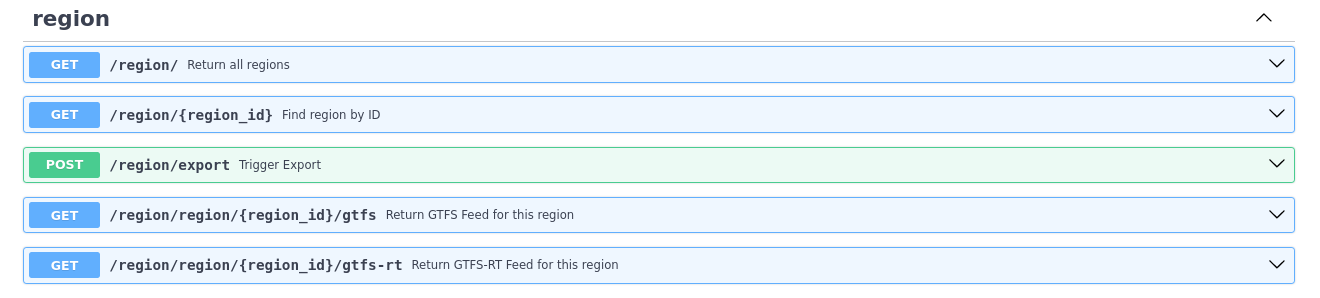
image

GTFS endpoints are in the right place now ![image](/attachments/16f3439a-d002-4412-9985-02b94fe4aa75)
Owner

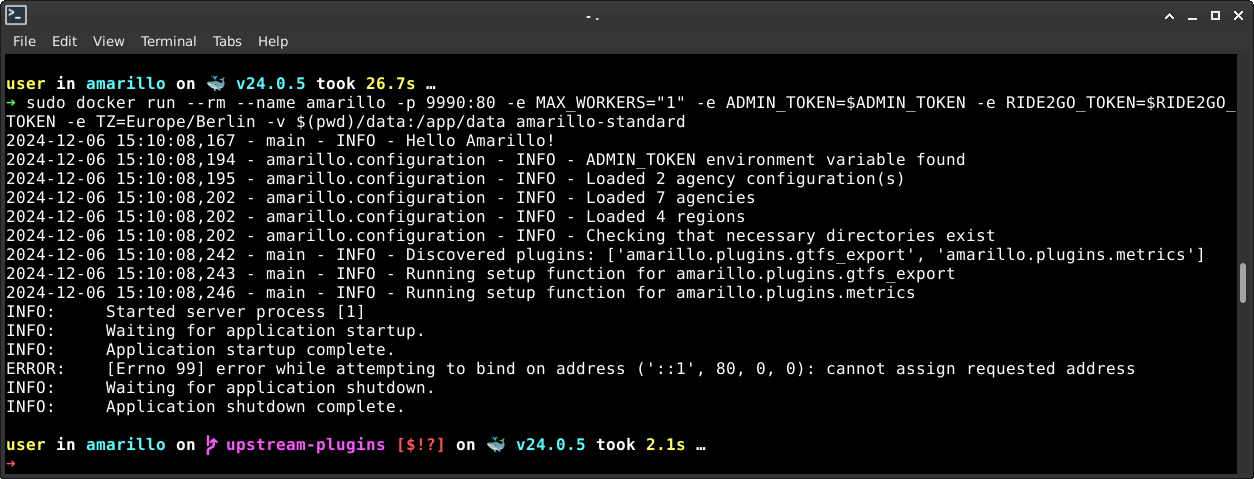
Start starts using 127.0.0.1 - should be localhost everywhere, incl. the console output

i added --host=localhost and it runs from VS Code
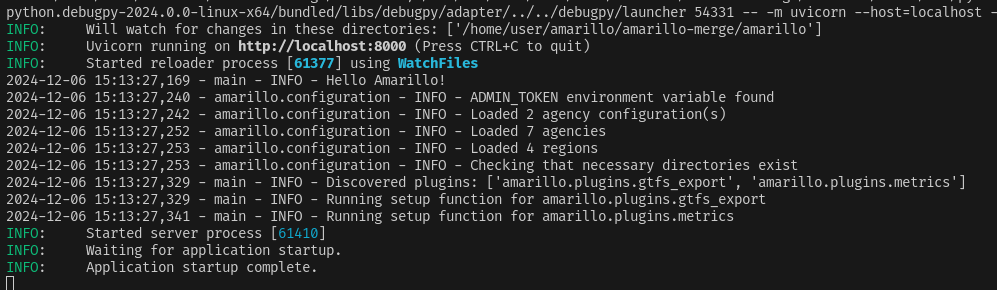
image
but in docker it is not happy
image

> Start starts using 127.0.0.1 - should be localhost everywhere, incl. the console output i added --host=localhost and it runs from VS Code ![image](/attachments/c75d73d8-944d-47f5-8b25-c7947438d933) but in docker it is not happy ![image](/attachments/48f25d6e-9ffc-45aa-9c27-1bc06c5f712a)
Owner

How to develop concurrently amarillo and it's plugins?

Put in README

I've pushed it to the plugins branch now

> > How to develop concurrently amarillo and it's plugins? > > Put in README I've pushed it to the plugins branch now
Owner

For the OPTIONS requests i am getting 405 - Method Not Allowed, and the same in the logs. What is the confusing log message?

For the OPTIONS requests i am getting 405 - Method Not Allowed, and the same in the logs. What is the confusing log message?
Owner

amarillo.plugins.metrics.metrics - WARNING - File 'error.log' not found.

I have not found this error in the logs for dev or mitanand. However, logging.conf was outdated, I've updated it to create the log file, that should fix this.
Related:
amarillo-metrics is in the requirements.txt file, I believe it is a mistake because the base image should not contain plugins. Should I remove it or am I wrong about that?

> amarillo.plugins.metrics.metrics - WARNING - File 'error.log' not found. I have not found this error in the logs for dev or mitanand. However, logging.conf was outdated, I've updated it to create the log file, that should fix this. Related: amarillo-metrics is in the requirements.txt file, I believe it is a mistake because the base image should not contain plugins. Should I remove it or am I wrong about that?
Owner

ADMIN_TOKEN=test RIDE2GO_TOKEN=test METRICS_USER=metrics METRICS_PASSWORD=metrics uvicorn amarillo.main:app: all required? then should be documented

RIDE2GO_TOKEN is not required. The rest i have added to amarillo-compose readme, main amarillo only needs the admin token.

> ADMIN_TOKEN=test RIDE2GO_TOKEN=test METRICS_USER=metrics METRICS_PASSWORD=metrics uvicorn amarillo.main:app: all required? then should be documented RIDE2GO_TOKEN is not required. The rest i have added to amarillo-compose readme, main amarillo only needs the admin token.
Owner

cascaded docker build: after amarillo-base, build amarillo-gtfs

The way we have it now is amarillo-base gets built, then amarillo-standard adds plugins for metrics and gtfs. They are separate dockerfiles, one based on the other. Is this just about renaming amarillo-standard to amarillo-gtfs, or something else entirely?

> cascaded docker build: after amarillo-base, build amarillo-gtfs The way we have it now is amarillo-base gets built, then amarillo-standard adds plugins for metrics and gtfs. They are separate dockerfiles, one based on the other. Is this just about renaming amarillo-standard to amarillo-gtfs, or something else entirely?
Sign in to join this conversation.
No labels
No milestone
No project
No assignees
2 participants
Notifications
Due date
The due date is invalid or out of range. Please use the format "yyyy-mm-dd".

No due date set.

Dependencies

No dependencies set.

Reference: amarillo/amarillo-core#18
No description provided.